How to Improve Website Speed
In a competitive digital landscape, website speed is crucial for user experience and conversion rates. A faster website keeps users engaged, reduces bounce rates, and can significantly impact your bottom line. This article outlines practical techniques and tools to boost your site's performance.
Understanding Website Performance
Website performance refers to how quickly your pages load and become interactive. Poor performance frustrates users and drives them away. Key metrics include:
- LCP (Largest Contentful Paint): Time for main content to load
- FID (First Input Delay): Time until page becomes interactive
- CLS (Cumulative Layout Shift): Visual stability during load
There are two broad categories of optimization:
- Frontend Optimization: Improving client-side performance—image optimization, code splitting, caching, and resource loading strategies.
- Backend Optimization: Server-side improvements—database queries, server response times, CDN usage, and compression.
Frontend Performance Strategies
This article focuses on frontend optimization techniques.
A popular tool for diagnosing and improving performance is Google Lighthouse.
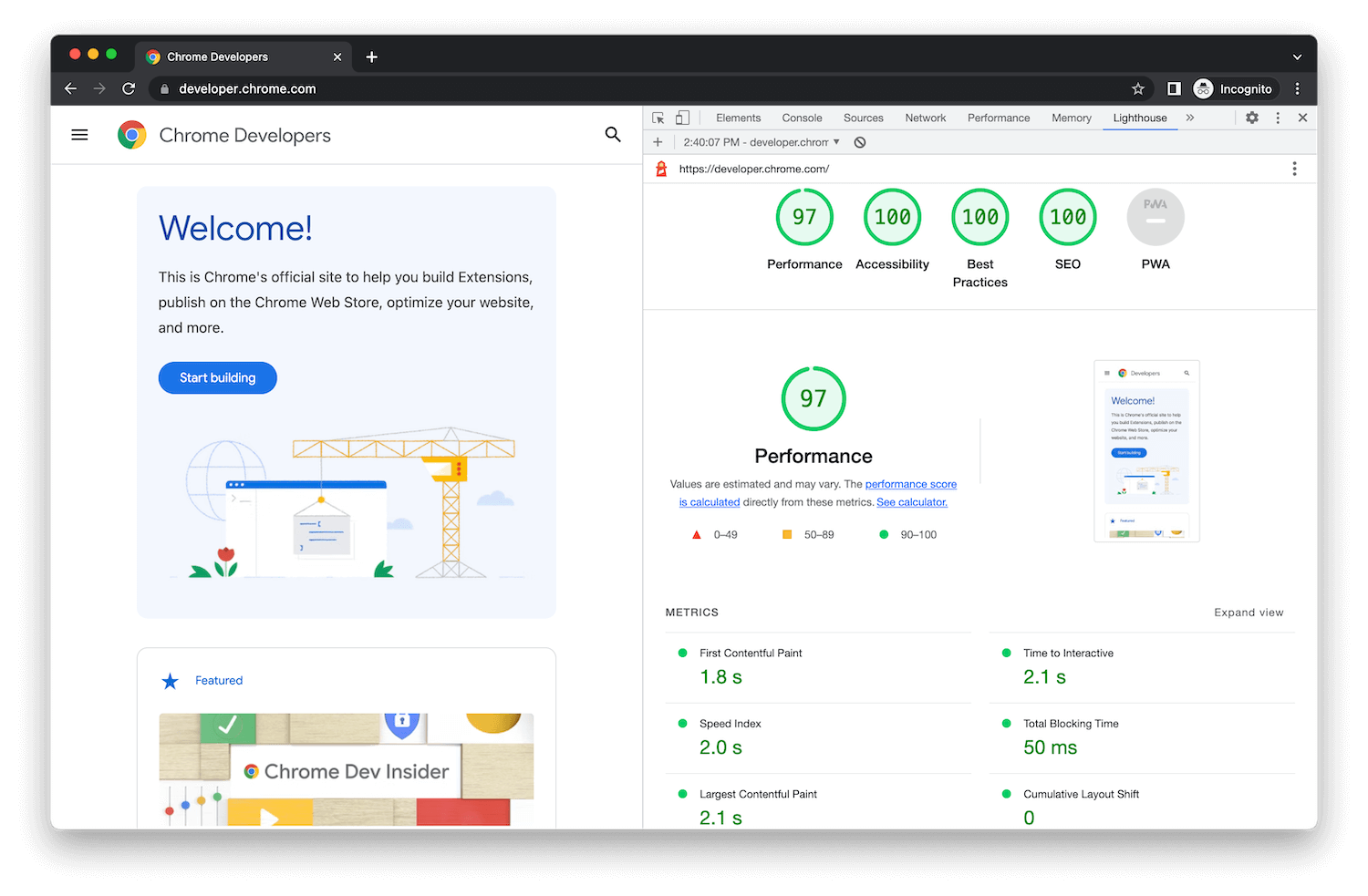
Lighthouse audits performance, accessibility, best practices, and SEO, and provides actionable recommendations to fix issues.
Here are effective frontend techniques you can apply.
Convert PNG/JPEG to WebP
Converting images to WebP can significantly reduce file sizes without noticeable quality loss, improving load times and Core Web Vitals.
WebP images are typically 50 - 80% smaller than PNG or JPEG. Pair this with a CDN for faster delivery and use srcset or sizes for responsive images across breakpoints.
<img
    src="https://res.cloudinary.com/daloihfzf/image/upload/f_auto,q_60,w_480/v1764949277/landing-image-5_rdkh3z.webp"
    srcset="
        https://res.cloudinary.com/daloihfzf/image/upload/f_auto,q_60,w_480/v1764949277/landing-image-5_rdkh3z.webp   480w,
        https://res.cloudinary.com/daloihfzf/image/upload/f_auto,q_70,w_768/v1764949277/landing-image-5_rdkh3z.webp   768w,
        https://res.cloudinary.com/daloihfzf/image/upload/f_auto,q_80,w_1920/v1764949277/landing-image-5_rdkh3z.webp 1920w,
        https://res.cloudinary.com/daloihfzf/image/upload/f_auto,q_80,w_2560/v1764949277/landing-image-5_rdkh3z.webp 2560w
    "
    sizes="(max-width: 480px) 480px, (max-width: 768px) 768px, 100vw"
    alt="Hero banner image"
    class="mot-banner-bg-image"
    fetchpriority="high"
    loading="eager"
    decoding="async"
/>
Brotli Compression or gzip Compression
Enable Brotli or gzip compression on your web server to reduce the size of HTML, CSS, and JavaScript files sent over the network. This decreases load times and improves user experience.
If you are using nginx, you can enable gzip compression by adding the following to your configuration:
server {
    # Gzip for proxy responses
    gzip on;
    gzip_types text/css application/javascript application/json text/plain text/html image/svg+xml;
    gzip_min_length 256;
    gzip_comp_level 6;
    gzip_vary on;
}
Prefetch Key Resources
Use <link rel="preload"> to prefetch critical resources like fonts, CSS, and JavaScript files. This helps browsers load these assets sooner, improving page load times.
For instance, to preload a font, or important javascript resources. Ideally, you want to load the largest resource first.
<!-- PRIORITY 1: DNS prefetch and preconnect for Cloudinary (reduce connection time) -->
<link rel="dns-prefetch" href="https://res.cloudinary.com" />
<link rel="preconnect" href="https://res.cloudinary.com" crossorigin />

<!-- PRIORITY 2: Preload LCP image FIRST (most critical resource) -->
<!-- Ultra-optimized for mobile: smaller sizes, lower quality -->
<link
rel="preload"
as="image"
href="https://res.cloudinary.com/daloihfzf/image/upload/f_auto,q_60,w_480/v1764949277/landing-image-5_rdkh3z.webp"
media="(max-width: 480px)"
fetchpriority="high"
imagesrcset="https://res.cloudinary.com/daloihfzf/image/upload/f_auto,q_60,w_480/v1764949277/landing-image-5_rdkh3z.webp 480w"
imagesizes="480px"
/>
Lazy load resources
Implement lazy loading for components using dynamic imports. If you are using Quasar, you can implement lazy loading like this:
<script>
import { defineAsyncComponent } from 'vue'
export default {
  components: {
    SomeComponent: defineAsyncComponent(() => import('components/SomeComponent.vue')),
  }
}
</script>
Host Fonts Locally
Self‑host fonts to eliminate third‑party latency and gain control over loading behavior.
External font CDNs can slow pages if they're congested or down. This example hosts Inter locally:
@font-face {
  font-family: 'Inter';
  src: url('/fonts/Inter-Medium.woff2') format('woff2');
  font-weight: 500;
  font-style: normal;
  font-display: swap;
}
Fix Accessibility Issues
Better accessibility improves usability for all users. Use semantic HTML, add alt text, ensure sufficient color contrast, and provide full keyboard navigation.
Optimize LCP (Largest Contentful Paint)
Identify your LCP element—often the biggest image or text block in the viewport. Optimizing how this element loads can dramatically boost perceived speed.
If the LCP is a hero image, compress, preload, and serve it in WebP. If it's text, ensure fonts are available quickly. Consider redesigning to reduce the LCP element's size.
Conclusion
With these changes, I significantly improved my Lighthouse performance score from 55 to 84.
However, performance optimization is an ongoing effort. I hope these techniques help you build a faster, more responsive website that keeps users engaged.