My Kubernetes homelab on a Raspberry Pi
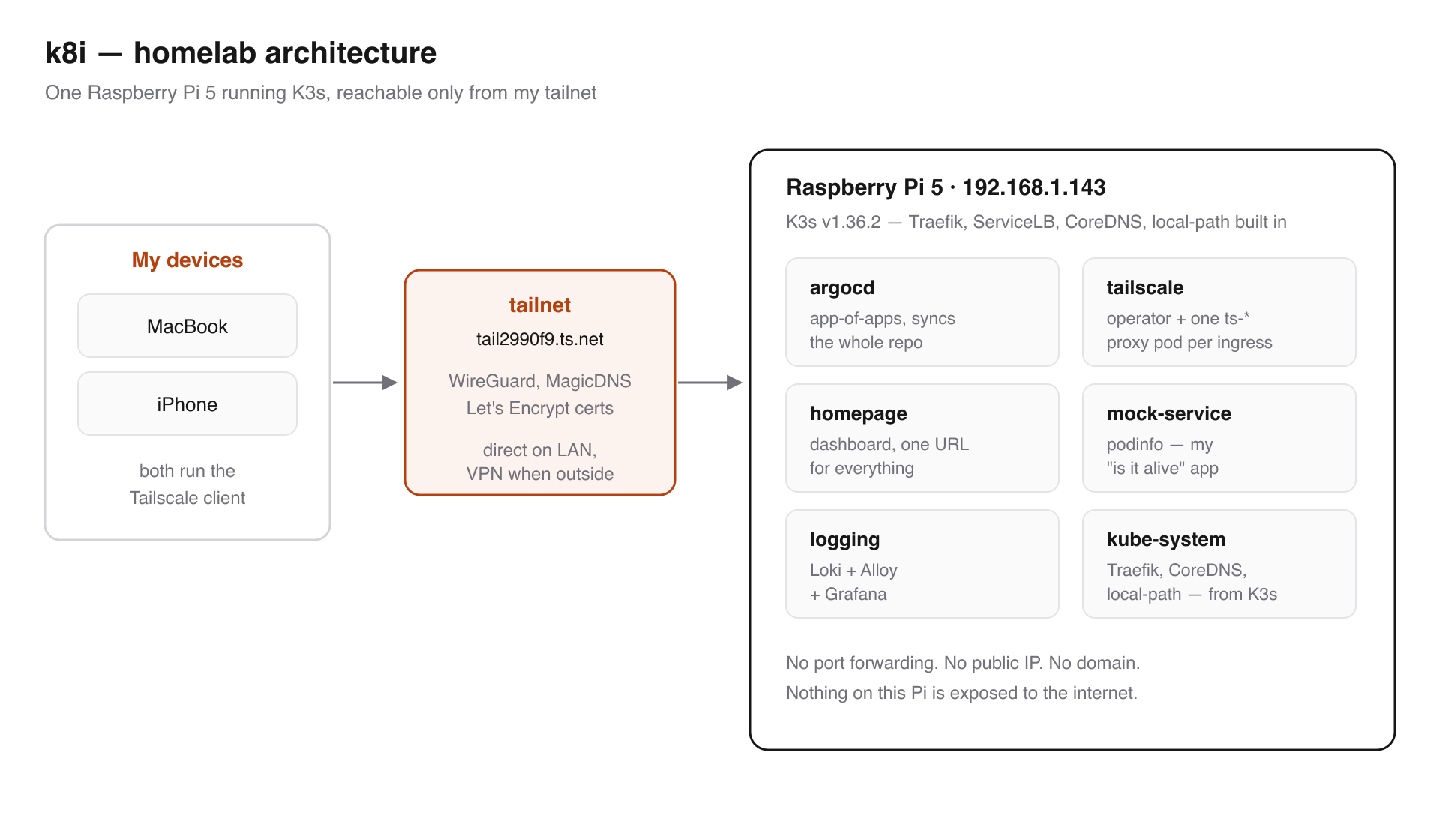
Hello! It has been a while since I last wrote. This post is about my homelab — a couple of Raspberry Pis sitting next to my router, running K3s, and managed entirely through Git.
I wanted a cluster that I actually own. Something I can break, fix, and rebuild without paying a cloud bill, and a place to run the small things I keep needing — a dashboard, a log stack, a mock service to poke at. The rules I set for myself were simple:
- Nothing gets configured by hand. If it is not in Git, it does not exist.
- I should be able to reach every service from my phone, without opening a single port.
- If a disk dies, I should be able to rebuild everything in two commands.
The three tools that made this work are K3s, ArgoCD and Tailscale.
The hardware
A Raspberry Pi 5 (arm64, Debian 13) as the control plane, booting from a Samsung T7 over USB, and a Pi 4 on an SD card as a worker. Both on WiFi. More Pis are planned.
There is only one hardware rule that really matters, and I learned it the hard way:
Give every Pi its own official power supply. A Pi 5 needs a genuine 5V/5A (27W) USB-C supply.
I was running mine on an underpowered charger. It browned out, and unclean resets corrupt
whatever was being written at that moment. In my case it zeroed out files inside cached
container images — the coredns image ended up with an empty /etc/passwd, and ArgoCD pods
crash-looped with exec /usr/bin/tini: exec format error because tini had become a 0-byte
file. I spent an evening convinced I had an arm64 architecture problem. I did not. I had a
power problem.
vcgencmd get_throttled # 0x0 = healthy, 0x50000 = undervoltage has occurred
Two other Pi-specific things worth knowing:
- The Pi firmware disables the memory cgroup, and kubelet refuses to start without it. Append
cgroup_memory=1 cgroup_enable=memoryto/boot/firmware/cmdline.txt(keep it a single line) and reboot.cat /sys/fs/cgroup/cgroup.controllersmust includememory. - Use a 64-bit OS on every node, or mixed-arch image pulls break in confusing ways.
Why K3s
K3s is Rancher's lightweight Kubernetes distribution — a single binary, and a much smaller memory footprint than upstream Kubernetes, which matters a lot on a Pi. It also ships with the pieces you would otherwise install yourself:
- Traefik as the ingress controller
- ServiceLB so
LoadBalancerservices actually get an address - CoreDNS for in-cluster DNS
- local-path as the default storage class
Installing it is one line, and joining a worker later is the same line with two environment variables:
# on the new node
curl -sfL https://get.k3s.io | \
  K3S_URL=https://192.168.1.143:6443 \
  K3S_TOKEN=<node-token> \
  sh -
GitOps with ArgoCD
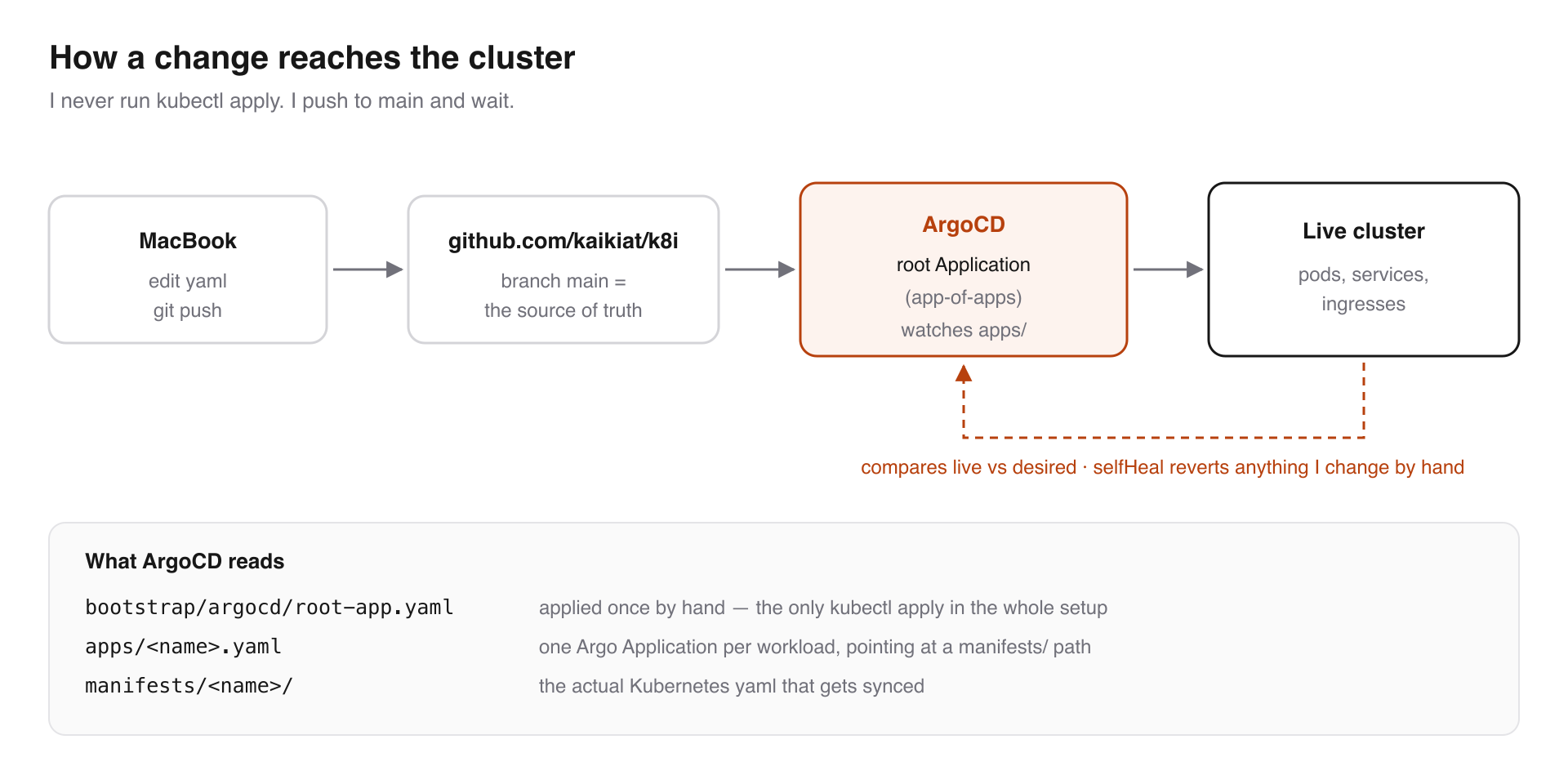
I have written about GitOps before, and this is the same idea applied to my own hardware. ArgoCD watches the repo, compares it against the live cluster, and syncs whenever the two differ.
The repo is laid out in three layers:
bootstrap/argocd/       # one-time bootstrap
  root-app.yaml         # app-of-apps root -> watches apps/
apps/                   # one Argo Application per workload
  homepage.yaml
  logging.yaml
  tailscale-operator.yaml
manifests/              # the actual k8s manifests each Application syncs
  homepage/
  logging/
The trick that keeps this tidy is the app-of-apps pattern. I apply exactly one thing by
hand, ever — a root Application that points at the apps/ directory. Every file in there is
itself an Application, so ArgoCD ends up managing its own list of applications.
// bootstrap/argocd/root-app.yaml
apiVersion: argoproj.io/v1alpha1
kind: Application
metadata:
  name: root
  namespace: argocd
spec:
  project: default
  source:
    repoURL: git@github.com:your-user/your-homelab-repo.git
    targetRevision: main
    path: apps
    directory:
      recurse: true
  destination:
    server: https://kubernetes.default.svc
    namespace: argocd
  syncPolicy:
    automated:
      prune: true
      selfHeal: true
Adding a new workload is now a boring, three-step routine: drop the manifests under
manifests/<name>/, add an apps/<name>.yaml pointing at that path, commit and push.
Nothing else. I do not run kubectl apply anymore.
Helm charts fit into the same model — the Tailscale operator is just an Application whose source happens to be a chart repository instead of my own:
// apps/tailscale-operator.yaml
spec:
  source:
    repoURL: https://pkgs.tailscale.com/helmcharts
    chart: tailscale-operator
    targetRevision: 1.98.4
  destination:
    namespace: tailscale
  syncPolicy:
    automated:
      prune: true
      selfHeal: true
A word of warning about
selfHeal: true— it means the cluster fights you. I edited a ConfigMap withkubectlto test something, and ArgoCD quietly reverted it within a minute. That is the point of it, but it is a surprising first experience. Commit and push instead.
Reaching it from anywhere with Tailscale
This is the part I like the most.
The usual homelab answer is port forwarding on your router, a dynamic DNS name, and cert-manager for TLS. That means putting your Pi on the public internet, which for a machine I mostly ignore is not a trade I wanted to make.
Tailscale is a mesh VPN built on WireGuard. Every device I own joins the same private network (a tailnet), and they talk to each other directly wherever they are. On my home WiFi the traffic stays on the LAN; from outside, it tunnels. Either way it is the same address.
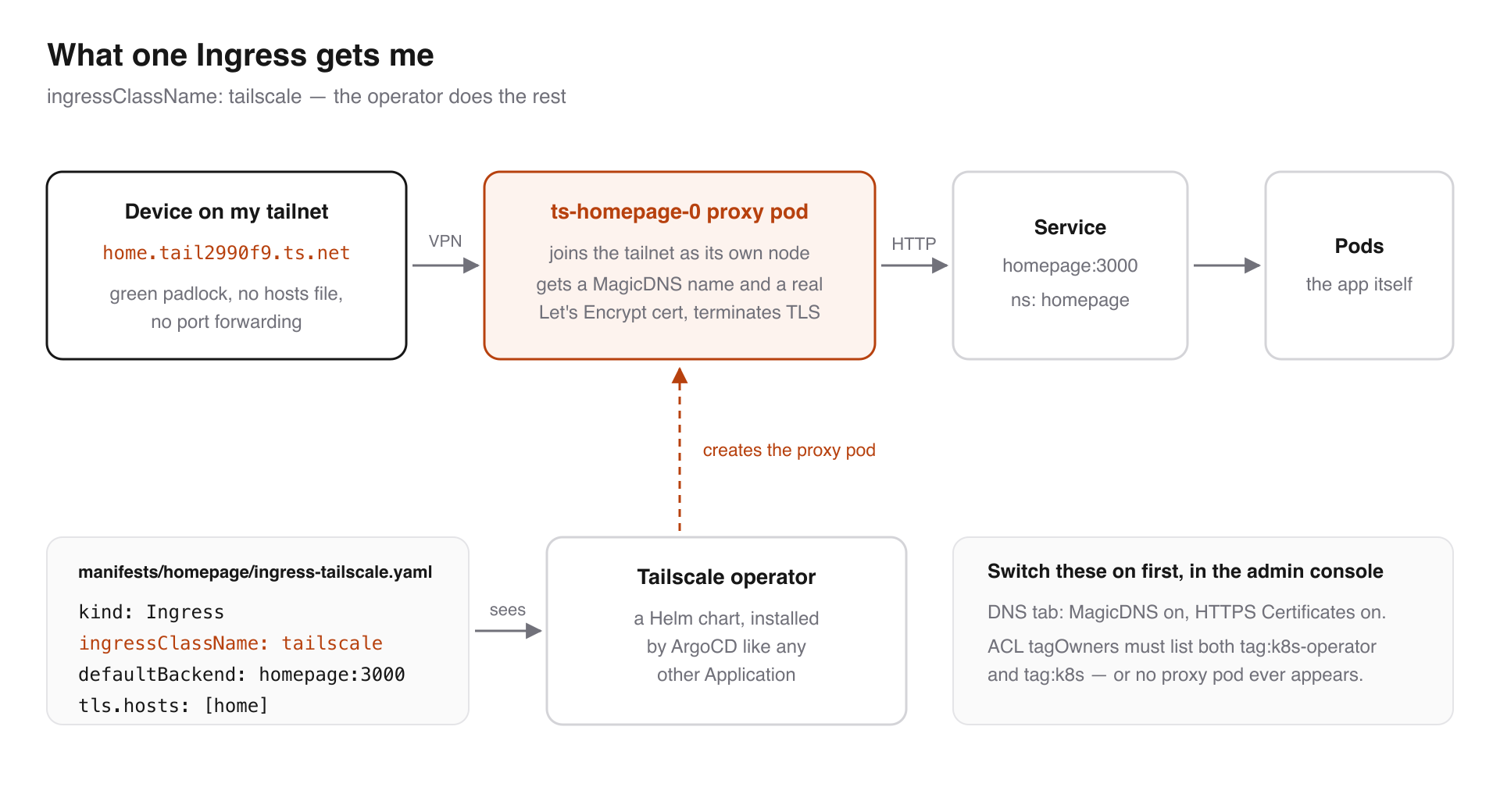
What makes it click with Kubernetes is the Tailscale Kubernetes operator. Once it is installed, exposing a service is one Ingress with a special ingress class:
// manifests/homepage/ingress-tailscale.yaml
apiVersion: networking.k8s.io/v1
kind: Ingress
metadata:
  name: homepage-ts
  namespace: homepage
spec:
  ingressClassName: tailscale
  defaultBackend:
    service:
      name: homepage
      port:
        number: 3000
  tls:
    - hosts:
        - home
The operator sees that Ingress and spins up a small proxy pod that joins the tailnet as its
own node, picks up a MagicDNS name, and provisions a valid Let's Encrypt certificate for
it. My dashboard is now at https://home.tail2990f9.ts.net, with a real padlock, from my
phone, from anywhere. No port forwarding, no domain purchase, no cert-manager.
Every service gets the same treatment — one small yaml file each:
https://home...— the Homepage dashboardhttps://argocd...— the ArgoCD UIhttps://logs...— Grafanahttps://podinfo...— my mock service
Two things cost me time here, both in the Tailscale admin console rather than in Kubernetes:
- In the DNS tab, MagicDNS and HTTPS Certificates both have to be on, or no certificate is ever issued.
- In Access Controls,
tagOwnershas to list both tags. Miss one and the operator fails withrequested tags [tag:k8s] are invalid or not permitted (400)and no proxy pod ever appears.
"tagOwners": {
  "tag:k8s-operator": [],
  "tag:k8s":          ["tag:k8s-operator"],
}
After fixing the ACL, restart the operator instead of waiting — its retry backoff can stretch
to about 17 minutes, which is a long time to sit staring at kubectl get pods.
kubectl -n tailscale rollout restart deploy/operator
For ArgoCD there is one extra detail: argocd-server runs with server.insecure=true so it
serves plain HTTP, and the Tailscale proxy terminates TLS in front of it. Otherwise you get
the classic double-TLS redirect loop.
Central logging
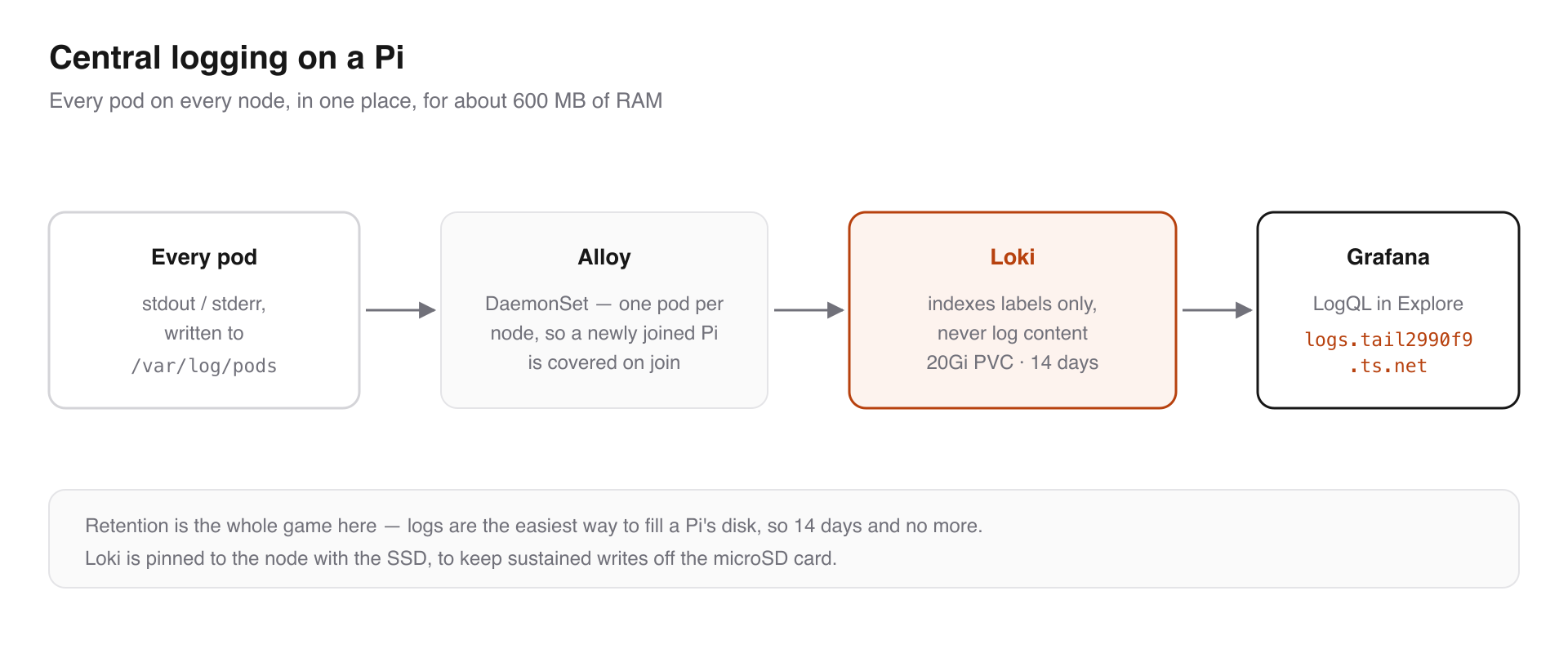
A cluster you cannot see into is not much fun to debug, so the next thing I added was central logging: Loki to store logs, Alloy to collect them, Grafana to read them.
Alloy runs as a DaemonSet and tails /var/log/pods on each node, which means a newly joined
Pi is covered automatically without me touching anything. Loki indexes only labels
(namespace, pod, container, app, node) and not the log content — that is exactly
what makes it viable on a Pi. The whole stack sits at around 600 MB of RAM.
Then you query it with LogQL from Grafana's Explore tab:
{namespace="argocd"}                          # everything in a namespace
{app="podinfo"} |= "error"                    # substring filter
{namespace=~".+"} |~ "(?i)(panic|fatal)"      # regex across the cluster
sum by (app) (rate({namespace="argocd"}[5m])) # log rate per app
The setting I would tell anyone to get right on day one is retention. Logs are the easiest way to fill a Pi's disk, so I keep 14 days on a 20Gi volume and no more. Loki is also pinned to the Pi with the USB SSD, to keep sustained writes off the microSD card.
Tracing is the obvious next step, but I have not deployed it yet — and unlike logs it would not be free. Logs show up on their own the moment a pod writes to stdout; traces only exist once a service is instrumented with an OTel SDK and the context propagates across every hop. That is real work per service, so it can wait until I have services worth tracing.
Rebuilding from scratch
The last piece was making the cluster disposable. Everything above still assumed a Pi that was already set up by hand, which is fine right up until the SD card dies.
So the OS-and-K3s layer is now Ansible, using the official k3s-ansible collection, and the
ArgoCD bootstrap is a small playbook of my own. From bare Raspberry Pi OS it is two commands:
# 1. install K3s on every node, enable the Pi memory cgroup, join the workers
ansible-playbook k3s.orchestration.site -i inventory.yml -e @secrets.yml

# 2. install ArgoCD, apply the two out-of-band secrets, apply the root app
ansible-playbook bootstrap-argocd.yml -e @secrets.yml
After the second one finishes, ArgoCD takes over and pulls everything else — podinfo, Homepage, the Tailscale operator, the log stack — straight from the repo. Both playbooks are idempotent, so I can re-run them any time I reflash a node.
Only two secrets ever live outside Git: the repo deploy key and the Tailscale OAuth credentials. The playbook renders them onto the master, applies them, and deletes the rendered files.
Things I would tell myself before starting
- Fix the power first. Almost every strange failure I hit traced back to undervoltage. A proper PSU is the cheapest reliability upgrade there is.
- Corrupt container images do not heal with a re-pull. containerd reuses the cached layers,
so a re-pull only fetches the manifest. The fix is to stop k3s, delete
/var/lib/rancher/k3s/agent/containerd, and reboot — a plain restart re-pulls everything at once and browned my Pi out all over again. - Wire it if you can. WiFi worked, but SSH drops during setup made everything feel broken when it was not.
- Write the runbook while you are suffering. My
docs/RUNBOOK.mdis just the notes I took during a bad week, and it has already saved me twice.
What is next
- Another Pi 4, then a 3-node control plane with embedded etcd so a node can die. It needs its own 5V/3A supply, not the Pi 5's 27W one.
- A Mac Studio for running local LLMs. It stays off the cluster and just sits on the tailnet as an Ollama endpoint that the Pi can call.
- Pi-hole, pointed at as the tailnet nameserver so the blocking follows me off the home network.
- Getting the Pi 4 off its SD card too, so no node has one in the write path.
- A local container registry, so I stop pulling the same images across the internet.
- Immich for phone photos, once I trust the storage enough to put something irreplaceable on it.
- A small UPS, so a power blip stops being an event at all.
If you have been thinking about a homelab, one Pi and a Git repo is genuinely enough to start.
That's all for now. See you in the next one !
K3s: https://k3s.io/
Tailscale Kubernetes Operator: https://tailscale.com/kb/1236/kubernetes-operator
ArgoCD: https://argo-cd.readthedocs.io/